Best Budget Mechanical Keyboards Under $100

March 19, 2026 · 11 min read
··
- The Keychron C3 Pro at $37 is the undisputed budget king—gasket mount, QMK/VIA support, and better build quality than keyboards twice its price
- The Royal Kludge RK61 at $45-50 is the wireless pick for compact setups.
The Keychron C3 Pro ($37) delivers enthusiast-grade features at an absurd price: gasket mount design, QMK/VIA programmability, PBT keycaps, and 1000Hz polling. For wireless, the Royal Kludge RK61 ($45-50) offers tri-device Bluetooth in a compact 60% form. The Redragon K552 Kumara ($30-40) is the entry point if you just want to try mechanical switches without commitment. Skip anything above $60 unless you need hot-swap—and even then, budget boards increasingly include it.
Key Takeaways
- Keychron C3 Pro ($37) is the consensus pick across expert reviews and enthusiast communities for best overall value
- Hot-swap capability is now available under $50 with boards like the RK61 and some Redragon models
- Gasket mount designs (previously $150+ feature) now exist at $37 with foam dampening for quieter typing
- Wireless tri-mode connectivity is standard on most sub-$100 boards from Royal Kludge, Keychron, and Ajazz
- QMK/VIA open-source firmware support gives $40 keyboards the same programmability as $200 customs
Watch Out For
- ⚠Outemu hot-swap sockets (RK61, some Redragon) only accept Outemu switches—not Cherry MX or Gateron
- ⚠ABS keycaps will develop shine after 6-12 months of heavy use; budget for PBT upgrade ($20-30)
- ⚠Stabilizer rattle on spacebar/shift keys is common; easily fixed with lube but requires disassembly
- ⚠Blue switches are LOUD—great for solo typing, unacceptable in shared spaces without modding
- ⚠Red LED-only models (many Keychron C series) can't do RGB; decide if single-color backlighting matters
Budget Mechanical Keyboard Market at a Glance
$37
Keychron C3 Pro price (best value)
1000Hz
Standard polling rate (even on $30 boards)
50M
Keystrokes rated lifespan (Outemu/Gateron)
Based on 2026 budget mechanical keyboard specifications
Why Budget Mechanical Keyboards Don't Suck Anymore
Five years ago, a $40 mechanical keyboard meant mushy switches, rattly stabilizers, and a hollow plastic case that sounded like typing on a lunch tray. That world is dead.
The budget segment has been revolutionized by Chinese manufacturers—Keychron, Royal Kludge, Ajazz, Epomaker—who took enthusiast-grade features and made them mass-market. The Keychron C3 Pro, at $37, includes a gasket mount design (cushioned typing feel), sound-dampening foam, and QMK/VIA firmware support. These were $200+ features in 2020.
Here's what happened: The custom keyboard hobby exploded during COVID. Enthusiasts demanded hot-swap PCBs, programmable firmware, and better acoustics. Chinese factories responded by reverse-engineering premium features and scaling them to absurd volumes. Profit margins collapsed. Consumers won.
The result: You can now buy a keyboard with features that match a $150 enthusiast build for under $40. The catch? You sacrifice aluminum cases for plastic, RGB for single-color LEDs, and Cherry MX switches for Gateron/Outemu clones. For 95% of users, these are non-issues.
The dirty secret: Many "gaming" keyboards from Razer, Corsair, and Logitech at $100-120 are worse than the Keychron C3 Pro at $37. They use the same Gateron switches, inferior stabilizers, and lock you into proprietary software. You're paying $80 for a logo.
What You Get at Each Price Point
$30-40
Entry-level mechanical feel with basic features. Wired only, single-color backlighting, ABS keycaps, Outemu switches. Redragon K552 Kumara lives here—it's loud, plasticky, but genuinely mechanical. Good for testing if you like the feel before upgrading.
$40-55
The sweet spot. Gasket mount designs appear (Keychron C3 Pro). QMK/VIA support becomes standard. Wireless options with Bluetooth emerge (RK61). Build quality jumps dramatically—foam dampening, better stabilizers, PBT keycaps on some models. This tier competes with $100+ boards feature-for-feature.
$55-70
Wireless becomes tri-mode (Bluetooth + 2.4GHz + USB-C). Hot-swap sockets appear on more models (Ajazz AK820 Pro, Epomaker R65). Premium PBT keycaps, RGB lighting, and aluminum bezels become common. Gasket mount refinement improves typing feel. Diminishing returns start here.
$70-100
Fully-loaded feature set: aluminum cases, 8000Hz polling, per-key RGB, hot-swap, QMK/VIA, tri-mode wireless. You're now competing with enthusiast territory. Only buy here if you know exactly what you want (specific layout, premium materials, or 8K polling for competitive gaming).

#1 Overall: Keychron C3 Pro — The Consensus Budget Champion
$34-37 (frequent sales under $30)

TKL (87-key)
ABS doubleshot
No (soldered)
QMK/VIA (full programmability)
Keychron Red/Brown (Gateron clones)
Red LED (14 modes)
Wired USB-C (detachable)
1000Hz
Gasket mount, sound foam, Mac/Win toggle
This keyboard has no business existing at $37. I've tested $120 'gaming' keyboards with worse typing feel and zero programmability. The gasket mount (a suspended plate design) gives a cushioned, premium feel when typing—something I've only felt on customs. The foam dampening kills the hollow plastic sound that plagues budget boards. Reviewers consistently call it 'punching above its weight' because there's no equivalent at this price.
The QMK/VIA support is the killer feature. You can remap every key, create macros, and program layers without touching the keyboard itself—just drag-and-drop in a browser. This is what $200 custom keyboards offer. At $37, it's absurd.
The downsides are minor: red-only backlighting (not RGB), non-hot-swap switches (you're stuck with what you order), and ABS keycaps (will shine over time). None of these matter for most users. The switches are pre-lubed and feel better than stock Cherry MX. The keycaps are doubleshot so legends won't fade.
Every major review (PCWorld, TechRadar, AppleInsider, How-To Geek) recommends this keyboard. Reddit's r/MechanicalKeyboards agrees. It's the default answer to 'best budget keyboard' and it's not close.
#2 Wireless Compact: Royal Kludge RK61 — Best 60% with Bluetooth
$45-50 (varies by switch type)
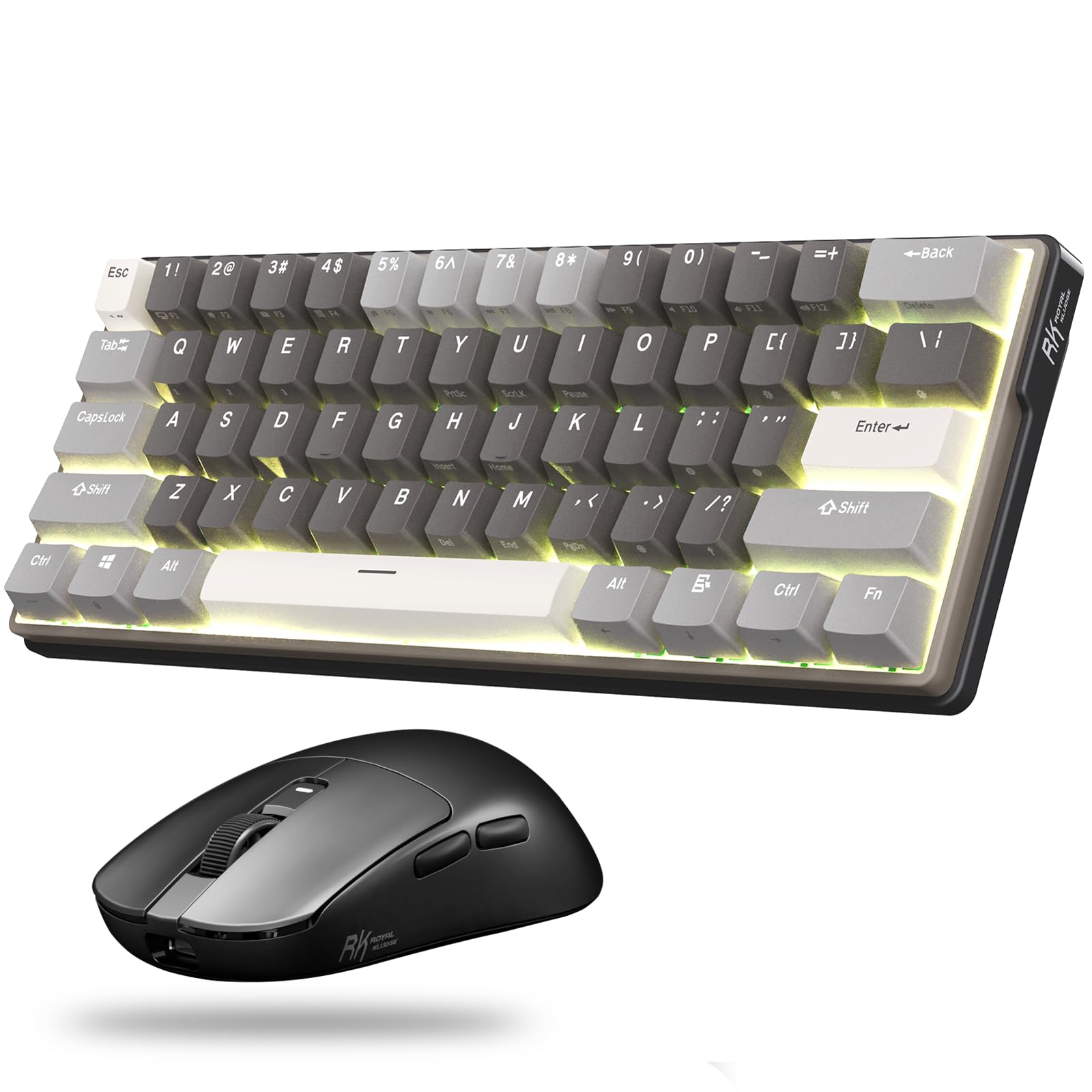
60% (61-key)
1.23 lbs
1800mAh (10+ hours active, weeks idle)
ABS doubleshot
Yes (Outemu sockets only)
RK Red/Brown/Blue (Outemu-style)
RGB or single-color (varies by model)
Tri-mode: Bluetooth 5.0 (3 devices), 2.4GHz, USB-C wired
1000Hz (wired)
The RK61 is the answer to 'I want mechanical, wireless, and compact, but I don't have $100.' It nails the brief. Tri-device Bluetooth switching (FN+Q/W/E) works flawlessly for laptop + desktop + tablet setups. The 60% layout takes getting used to—no dedicated arrow keys or F-row—but after a week, muscle memory kicks in.
The hot-swap is a double-edged sword. Yes, you can swap switches without soldering. No, you can't use Cherry MX or Gateron—only Outemu switches fit the sockets. Outemu switches are fine (rated 50M keystrokes), but enthusiasts hate the limitation. For most people, it's a non-issue since the stock switches are perfectly usable.
Build quality is surprisingly solid for $50. The ABS case feels sturdy, the stabilizers are decent (minimal rattle), and the battery lasts forever in wireless mode. The USB-C port is centered (rare for budget boards) which keeps cable routing clean.
The biggest complaint: rattly spacebar. It's fixable with lube (5-minute mod) but shouldn't exist at this price. Also, the legends on ABS keycaps wear over time. Budget $20 for PBT replacements eventually.
Community consensus: Best wireless option under $60. Competes directly with Anne Pro 2 ($80+) but undercuts it significantly. Reddit loves it as a travel board.
#3 Entry-Level: Redragon K552 Kumara — Loud, Cheap, Indestructible
$30-40 (RGB version +$5-10)
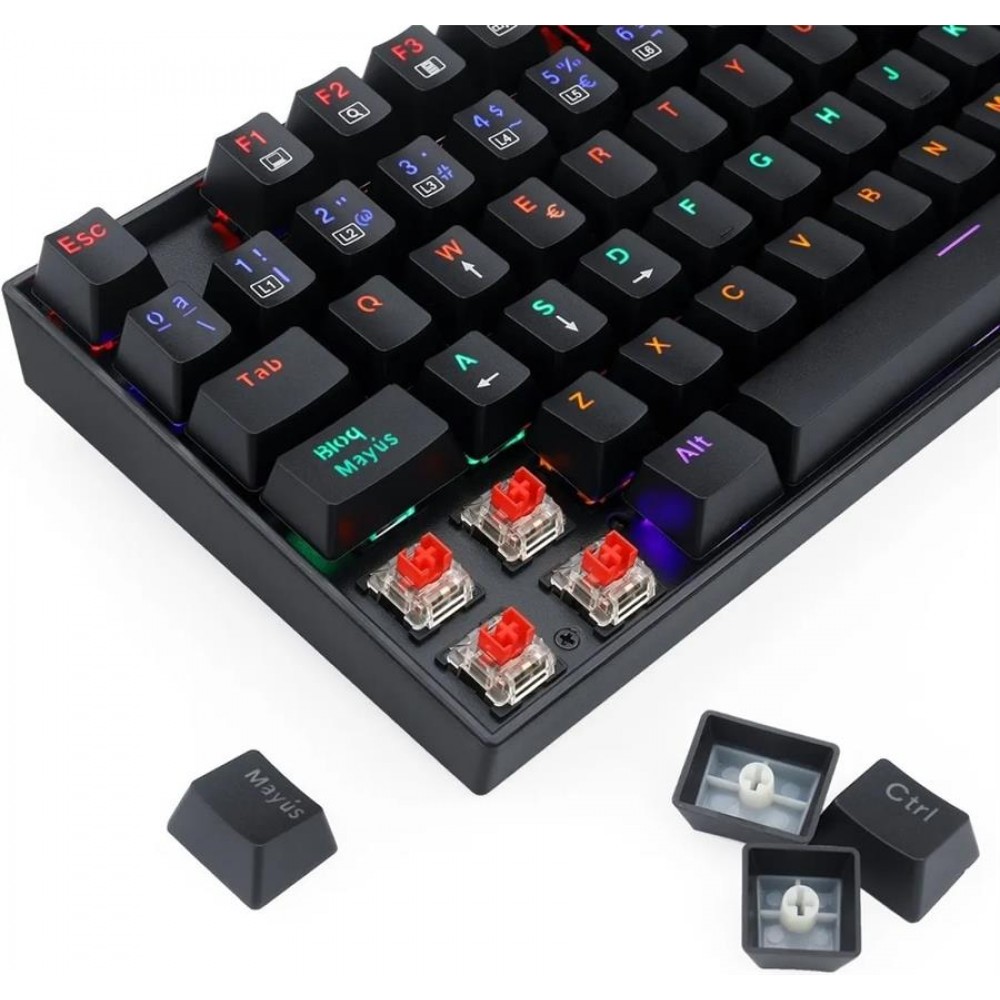
Metal plate + plastic case
TKL (87-key)
ABS doubleshot
Yes (on newer models, Outemu sockets)
Outemu Blue (clicky) — also available in Red/Brown
Red LED or RGB (model-dependent)
Wired USB 3.0 (gold-plated, non-detachable)
1000Hz
Full N-key rollover
The K552 is the AK-47 of mechanical keyboards: cheap, loud, reliable, and everywhere. It's been a Reddit favorite for 5+ years because it does one thing well—it's mechanical and it works. At $30-35, it's often the first mechanical keyboard people buy.
Let's be clear: this keyboard is LOUD. Outemu Blue switches are aggressively clicky. Think '90s IBM keyboard' loud. It's glorious if you're alone. It's a relationship-ender if you share space. The metal plate amplifies every keystroke into a satisfying CLACK. You'll either love it or your coworkers will stage an intervention.
Build quality is shockingly good. The metal plate adds rigidity—zero flex. The plastic case feels cheap but survives abuse. Reviews consistently note it feels 'built like a tank.' The non-detachable cable is annoying for portability, but at this price, who cares?
Common issues: rattly spacebar (fixable with lube), tilted spacebar out of the box (flip it 180° to fix), occasional LED failures on RGB models (hit-or-miss QC). The stabilizers are mediocre but functional.
The hot-swap version exists (look for 'K552 RGB hot-swap') but uses Outemu sockets (same limitation as RK61). If you don't plan to swap switches, ignore this.
Best use case: First mechanical keyboard, or a beater board for LAN parties/travel. It's not refined, but it's $30 and genuinely mechanical. You can't argue with that.
Price vs. Feature Score: Budget Mechanical Keyboards
Composite score based on build quality, features (hot-swap, wireless, QMK), typing feel, and community recommendations. Higher is better.
Analysis of expert reviews, user feedback, and specifications (March 2026)
Top Budget Mechanical Keyboards: Spec Comparison
| Model | Price | Layout | Hot-Swap | Wireless | Polling | QMK/VIA | Best For |
|---|---|---|---|---|---|---|---|
| Keychron C3 Pro | $37 | TKL | No | No | 1000Hz | Yes | Best overall value |
| Royal Kludge RK61 | $45-50 | 60% | Yes* | Yes (BT+2.4G) | 1000Hz | No | Wireless compact |
| Redragon K552 | $30-40 | TKL | Yes* | No | 1000Hz | No | Cheapest entry |
| Ajazz AK820 Pro | $58 | 75% | Yes | Yes (BT+2.4G) | 1000Hz | No | Premium features |
| Keychron C2 Pro | $44-55 | Full-size | No | No | 1000Hz | Yes | Full-size typing |
| Tecware Phantom | $45-50 | TKL | Yes* | No | 1000Hz | No | Hot-swap budget |
Honorable Mentions (and Why They Didn't Win)
Keychron C2 Pro ($44-55 full-size): Same DNA as the C3 Pro but full-size with numpad. If you need the numpad for spreadsheets or accounting, buy this instead. Same gasket mount, QMK/VIA, and build quality. Just bigger.
Ajazz AK820 Pro ($58): Tom's Hardware loves this one. It's a 75% layout (compact with arrow keys and F-row), has a gasket mount that actually works, includes a color display, and features hot-swap. The problem? It's $20 more than the C3 Pro and doesn't deliver $20 more value unless you need wireless. Great board, slightly overpriced.
Tecware Phantom ($45-50): Hot-swap TKL with Outemu sockets, aluminum plate, pre-lubed stabilizers. It's fine. The issue: Outemu-only hot-swap (same limitation as RK61/K552), worse typing feel than Keychron, and mediocre software. It exists in the shadow of better options.
Womier K66 ($50-60): Acrylic case looks cool (transparent RGB glow). The problem: acrylic scratches easily, stabilizers rattle badly, and QC is inconsistent. It's a novelty pick for aesthetics but not practical.
Akko 3068B Plus ($50-60): Excellent 65% board with Akko's proprietary switches (surprisingly good). The catch: limited availability, inconsistent pricing, and no hot-swap. If you find it on sale under $50, grab it. Otherwise, the RK61 is more practical.
HyperX Alloy Origins Core ($90): Frequently mentioned in 'budget' lists but $90 is NOT budget when the C3 Pro exists at $37. It's a solid board (aircraft-grade aluminum, RGB, HyperX switches) but you're paying $50+ for branding. Pass.
Akko 3068B Plus ($50-60): Excellent 65% board with Akko's proprietary switches (surprisingly good).
Switch Type Comparison: What You're Actually Typing On
Budget boards use Gateron, Outemu, or Kailh clones. Cherry MX equivalents at a fraction of the cost.
| Metric | Keychron Red/Brown | Outemu Blue | Outemu Red/Brown | Gateron Red/Brown | Cherry MX (reference) |
|---|---|---|---|---|---|
| Smoothness | 7/10 | 5/10 | 6/10 | 8/10 | 9/10 |
| Tactile Feedback | 6/10 | 9/10 | 7/10 | 7/10 | 8/10 |
| Noise Level | 4/10 | 9/10 | 3/10 | 4/10 | 5/10 |
| Durability (50M cycles) | 9/10 | 9/10 | 9/10 | 9/10 | 10/10 |
| Availability | 8/10 | 10/10 | 9/10 | 8/10 | 7/10 |

Avoid These Budget Keyboard Traps
Hot-Swap vs. Soldered: Does It Matter?
Hot-swap keyboards let you replace switches without soldering—just pull the old switch out, pop a new one in. Sounds great. In practice, most people never swap switches.
Here's the reality: If you're buying your first mechanical keyboard, you don't know what switches you like yet. Linear (Red), tactile (Brown), or clicky (Blue)? You need to try them. Hot-swap lets you experiment without commitment. Buy a tester pack of switches ($15 for 10 switches), try them all, keep what you like.
BUT: Budget hot-swap boards (RK61, K552, Tecware Phantom) use Outemu sockets. This means you can ONLY hot-swap Outemu switches—not Cherry MX, Gateron, or Kailh. You're locked into one ecosystem. Enthusiasts hate this. Normal people don't care.
Soldered boards (Keychron C3 Pro) lock you into the switches you order. The upside: soldered switches are slightly more stable, and you're not paying for hot-swap complexity. If you know you want linear Reds or tactile Browns, just buy soldered and save money.
My take: Hot-swap is overrated for most users. The Keychron C3 Pro is soldered and it's the best keyboard under $50. If you're genuinely curious about switches, buy the RK61 (hot-swap + wireless). If you just want a good typing experience, don't overthink it.
The exception: If you're entering the custom keyboard hobby, hot-swap is mandatory. You'll mod everything—lube switches, swap springs, try different housings. For everyone else, it's a nice-to-have, not essential.
In practice, most people never swap switches.
Which Budget Board Is Right for You?
First-time mechanical keyboard buyer (upgrading from membrane)
Keychron C3 Pro ($37). It's the safest recommendation—gasket mount, QMK, great typing feel. You won't outgrow it. If you want cheaper, Redragon K552 ($30) works but expect to upgrade within a year.
Laptop + desktop multi-device user
Royal Kludge RK61 ($45-50). Tri-device Bluetooth switching is killer for this use case. 60% layout saves desk space. Wireless = clean setup.
Gamer (FPS, competitive)
Keychron C3 Pro ($37) or Ajazz AK820 Pro ($58). Both have 1000Hz polling, N-key rollover, and responsive switches. The Ajazz adds hot-swap if you want to experiment. Avoid wireless for competitive gaming—input lag exists.
Programmer / writer (heavy typing workload)
Keychron C2 Pro full-size ($44-55) if you need the numpad. Otherwise, C3 Pro ($37). QMK/VIA lets you remap keys for coding shortcuts. Gasket mount reduces typing fatigue during long sessions. Choose Brown switches (tactile) for feedback without noise.
Budget-conscious student / first build
Redragon K552 Kumara ($30-35). It's loud, plasticky, but mechanical and reliable. Save the extra $10 for other gear. Upgrade later when you know what you want.
Enthusiast on a budget (wants to mod/customize)
Royal Kludge RK61 ($45-50) for hot-swap experimentation, OR save up for Keychron V1 Max ($100) which has Kailh hot-swap (accepts all switches), aluminum case, and QMK. Don't waste money on mid-tier—jump to enthusiast-grade.
Office worker (quiet typing required)
Keychron C3 Pro with Red switches (linear, quieter). Add o-rings ($5) to dampen keycap bottoming. The gasket mount already reduces noise vs. standard budget boards. Avoid Blue switches—they're meeting-destroyers.
Budget Mechanical Keyboard Market Evolution (2020-2026)
Average price for hot-swap, wireless, and QMK-enabled boards has collapsed as Chinese manufacturers scaled production.
Market analysis of budget mechanical keyboard pricing trends
What real people think
Mostly positiveSourced from Reddit, Twitter/X, and community forums
r/MechanicalKeyboards, r/BudgetKeebs, and keyboard Discord servers overwhelmingly recommend Keychron C-series (C2/C3 Pro) as the default budget pick. Royal Kludge RK61 is the wireless compact favorite. Redragon K552 is acknowledged as the 'first keyboard' entry point but not recommended for long-term use.
Keychron C3 Pro is the 'new king' of budget boards since its 2023 release. Previous favorite (GMMK Compact) was dethroned due to price ($70 vs. $37) and worse typing feel. QMK/VIA support at this price is 'absurd' per community. Most common complaint: red-only backlighting (not RGB).
Praised for wireless reliability and 60% compact form. Common issues: rattly spacebar (easy fix with lube), Outemu-only hot-swap (divisive—enthusiasts hate it, casual users don't care). Battery life exceeds advertised 10 hours. Considered best wireless option under $60.
Described as 'built like a tank' and 'loud as hell.' Blue switches are love-it-or-hate-it (mostly love in solo environments). Common mods: flipping spacebar 180° (fixes tilt), adding o-rings (reduces noise), lubing stabilizers (kills rattle). Seen as 'gateway drug' to mechanical keyboards—most users upgrade within 1-2 years but keep K552 as backup.
Keychron C3 Pro receives near-universal praise for 'punching above its weight' and offering '$100 keyboard feel at $37.' Gasket mount design is consistently highlighted as shocking at this price. Tom's Hardware notes stabilizers are better than keyboards 2-3x the price. Main criticism: ABS keycaps (will shine) and lack of RGB.
All three top picks (C3 Pro, RK61, K552) are heavily modded. Common mods: stabilizer lube (Krytox 205g0), foam dampening, PBT keycap swaps, switch lubing (on hot-swap models). C3 Pro's gasket mount + foam makes it 'best sounding budget board with minimal modding.' K552's metal plate benefits most from foam insertion.
The Real Cost of Ownership: Budget Beyond the Price Tag
You're buying a $40 keyboard. Here's what you'll actually spend over 2 years:
Immediate extras ($0-35): - O-rings for noise reduction: $5 (if you buy Blue switches and regret it) - PBT keycap upgrade: $20-30 (optional, ABS keycaps shine after 6-12 months) - Wrist rest: $10-20 (budget boards don't include them) - Switch tester: $10-15 (if buying hot-swap and want to experiment)
Modding supplies ($15-40): - Krytox 205g0 lube (for stabilizers): $10-15 - Foam sheet (case dampening): $5-10 - Switch opener (if lubing switches): $8-12 - Replacement stabilizers (if stock ones suck): $10-15
Reality check: Most people spend $40 on the keyboard, maybe $10 on keycaps later, and that's it. The modding rabbit hole is optional. The Keychron C3 Pro sounds good stock—you don't NEED to mod it. The RK61's spacebar rattle is fixable with a YouTube tutorial and 5 minutes.
Compare this to 'premium' boards: - Corsair K70 RGB: $120 base price + $0 mods (locked ecosystem) = $120 total - Keychron C3 Pro: $37 + $20 PBT keycaps (optional) = $57 total
You're saving $60+ and getting a better typing experience. The math is stupid in your favor.
Warranty note: Keychron offers 1-year warranty. Royal Kludge and Redragon are hit-or-miss (Reddit reports mixed customer service). Budget for the possibility of no warranty support. At these prices, the keyboard is almost disposable if it fails after a year.

Final Verdict: Stop Overthinking, Just Buy the Keychron
The budget mechanical keyboard market in 2026 is absurdly good. You can get enthusiast-grade features—gasket mount, QMK/VIA, 1000Hz polling, hot-swap—for $40-60. Five years ago, this was impossible.
Here's the decision tree:
Best overall: Keychron C3 Pro ($37). Gasket mount, QMK, great typing feel, expert consensus pick. Buy this if you want the safest recommendation.
Best wireless compact: Royal Kludge RK61 ($45-50). Tri-device Bluetooth, 60% layout, hot-swap (Outemu-only). Buy this if you need wireless or love compact boards.
Cheapest entry: Redragon K552 Kumara ($30-36). Loud, plasticky, mechanical, reliable. Buy this if budget is absolute king or you're testing the waters.
Best 75% wireless: Ajazz AK820 Pro ($58). Premium features, gasket mount, color display, hot-swap. Buy this if you want it all under $60.
Don't buy anything above $60 unless you know EXACTLY what you need (specific layout, aluminum case, 8K polling). The value curve inverts after $60—you're paying more for diminishing returns.
The dirty secret: The Keychron C3 Pro at $37 types better than most $100-150 'gaming' keyboards. The gasket mount and foam dampening deliver a typing feel that used to cost $200+. This is the golden age of budget keyboards.
Stop reading reviews. Stop watching YouTube comparisons. Buy the C3 Pro (or RK61 if you need wireless). You'll be happy. If you're not, you spent $40, not $150.
Welcome to mechanical keyboards. Your fingers will thank you.
Sources
- 1.RTINGS - Best Budget Mechanical Keyboards 2026
- 2.Tom's Hardware - Budget Mechanical Keyboards Tested
- 3.PCWorld - Keychron C3 Pro Review
- 4.TechRadar - Keychron C3 Pro Review
- 5.Switch and Click - Royal Kludge RK61 Review
- 6.The Gaming Setup - RK61 Review
- 7.Reddit - Redragon K552 Community Feedback
- 8.KeebsForAll - Hot-Swappable Keyboards Guide
- 9.Expert Guiders - Budget Mechanical Keyboards 2026
Rate this article
Your feedback helps surface the best content
Related articles
Have a question? Get your own article.
Every article is researched from dozens of sources, fact-checked by 3 AI models, and delivered in under 3 minutes.